No, Instagram does not notify when you screenshot a Story, post, Reel, profile, or regular DM in 2026. Instagram sends a screenshot alert in only one case: when someone screenshots a disappearing photo or video sent in a Direct Message (View Once or Vanish Mode). For everything else, Stories, Close Friends Stories, feed posts, Reels, profiles, Highlights, and regular DMs, the account owner gets nothing. This policy has not changed since Instagram removed Story screenshot alerts in 2018.
Beware of the viral rumour: posts claiming Instagram launched a 2026 feature that alerts users when their Story is screenshotted are fake news built to spark panic and drive shares. As covered in our breakdown of how the Instagram algorithm works, the app still does not notify creators when you screenshot or screen-record their Stories, grid posts, Reels, or profiles.
The moment you like someone's Instagram Story and think about saving it, the same worry pops up: does Instagram notify when you screenshot a Story? Stories are meant to be temporary, which naturally raises the question of whether the app quietly tells the creator when you capture one, and whether the same applies to posts, Reels, or DMs.
For almost everything on Instagram, the answer is no. You can save a funny meme, a travel photo, or a recipe from a Story without sending any alert. The one exception is a disappearing photo or video sent through Direct Messages, where a screenshot does notify the sender. This guide breaks down every content type, clears up the myths, and shows you how to protect your own Stories.
Does Instagram Notify When You Screenshot a Story or Post?
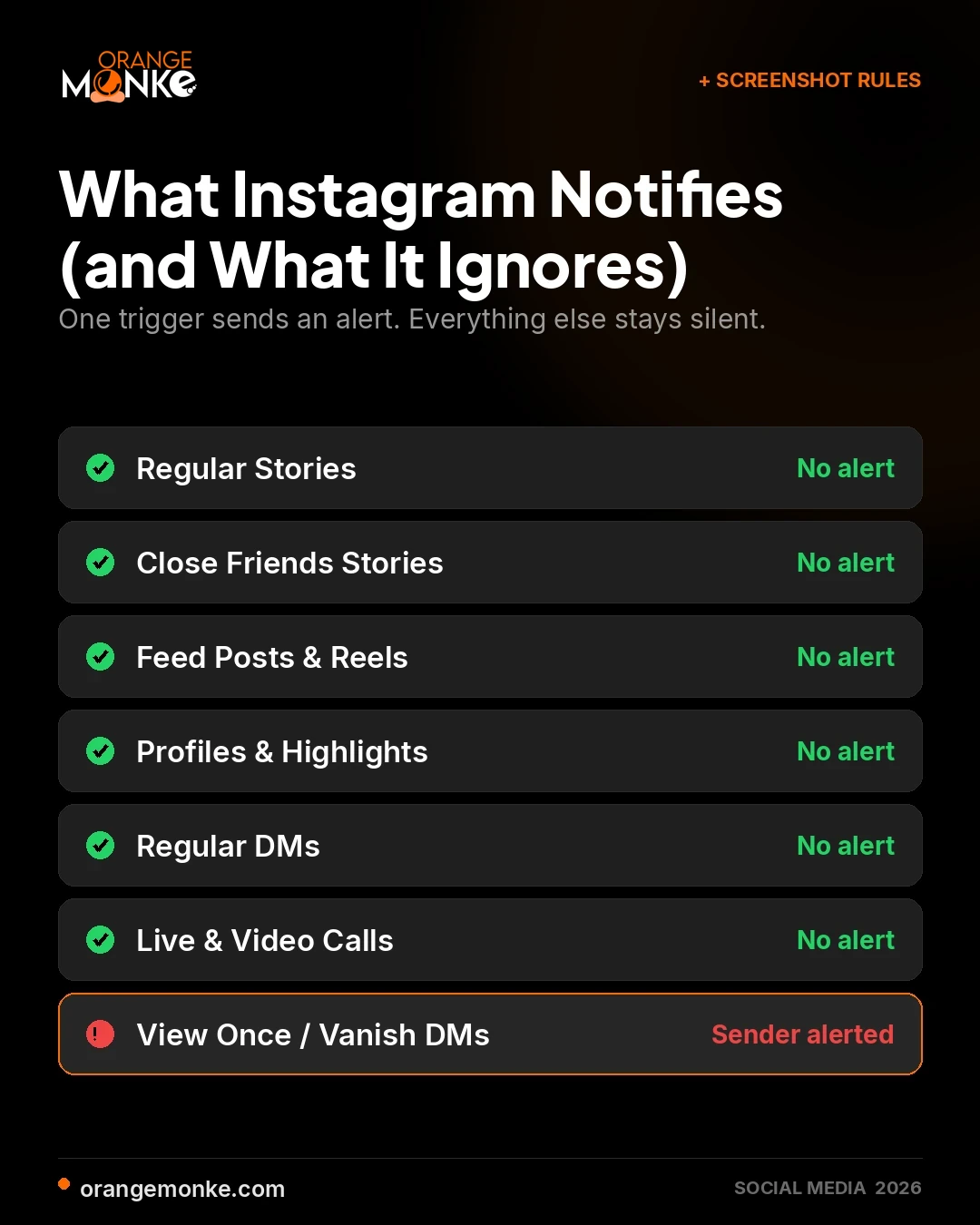
No, Instagram does not notify anyone when you screenshot a Story or a feed post, and it has worked this way since the alert was removed in 2018. You can screenshot any Story, whether it belongs to a public account, a private account, or a Close Friends list, and the owner receives no alert, no viewer-list flag, and no in-app log entry.
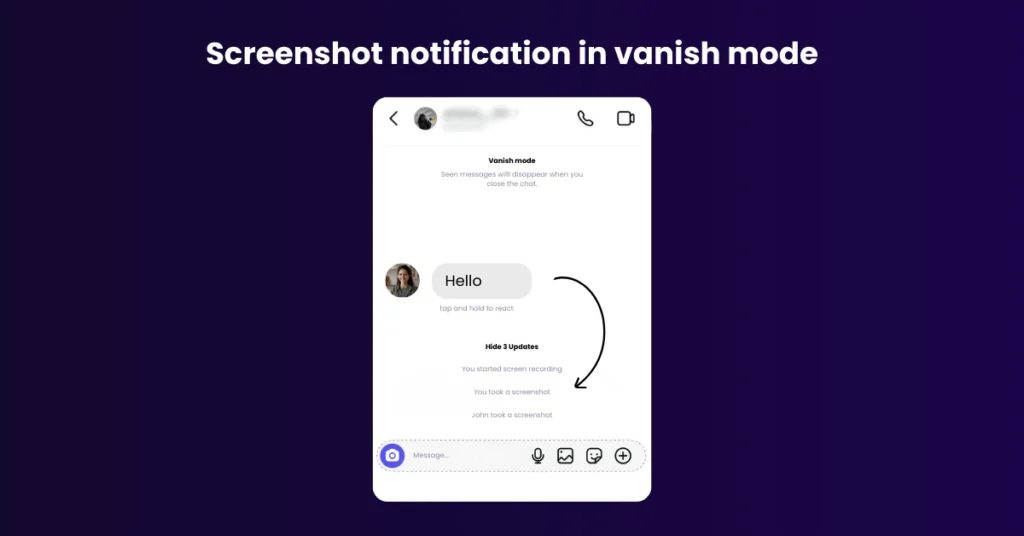
Instagram sends a screenshot notification in exactly one scenario: a disappearing image or video sent through a Direct Message. If someone shares View Once or Vanish Mode media and you capture it, Instagram alerts the sender inside the chat thread within seconds. That is the only trigger. Everything else on the platform is undetected, which is why social media teams can safely reference and repost Story content they have permission to use.
What Happens If You Screen Record an Instagram Story?
Screen recording an Instagram Story sends no notification, exactly like a static screenshot. Whether you capture a still frame or record your screen while the Story plays, the account owner is never alerted. The same rule covers Reels, feed posts, and Highlights.
The only place screen recording is detected is disappearing DM content. Record a View Once or Vanish Mode photo or video and the sender gets the same alert they would for a screenshot. If you want to save Story content without any risk of a slip-up, the bookmark and Save tools built into Instagram are the cleaner route.
Do You Get Notified When Someone Else Takes a Screenshot of Your Instagram Story?
No, you are never notified when someone screenshots your regular Story, and this holds for both public and private accounts. Even Stories shared with a small Close Friends circle stay silent, so you can post private moments without an alert firing every time a follower saves one.
The single exception is disappearing DM content. View Once messages and Vanish Mode chats notify you the instant they are captured. The table below maps every content type to its screenshot behaviour so you can see the pattern at a glance.
| Content Type | Screenshot Notification | Notes |
|---|---|---|
| Stories (Regular) | No | Screenshots of normal Stories do not alert the creator. |
| Stories (Close Friends) | No | Even private Close Friends Stories are safe to screenshot. |
| Feed Posts / Reels | No | Screenshots or screen recordings do not trigger alerts. |
| Profiles / Bios / Highlights | No | Profile content is public; no notifications. |
| Permanent DMs | No | Text and media saved in chat are not tracked. |
| Disappearing DMs (View Once / Vanish Mode) | Yes | The sender is notified immediately. |
The rule is simple: if content was built to disappear, captures are reported; if it stays permanently, captures are invisible.
What Can a Story Owner Actually See?
A Story owner can see who viewed, reacted, and replied, but never who screenshotted. Screenshot and screen-record activity sits completely outside everything Instagram reports back to the creator.
- Who viewed the Story: every account that opens it appears in the viewer list.
- Reactions and replies: emoji reactions and direct replies are visible.
- Reach and impressions: available for business and creator accounts.
- Sticker responses: poll, quiz, and question answers show up if you use interactive stickers.
Screenshotting a Story adds you to none of these lists, so there is no signal for the owner to read. If growing that viewer and engagement data is the goal, a structured social media marketing plan moves the numbers far more than worrying about screenshots.
Can You Tell If Someone Screenshots Your Instagram Story or Posts?
No, you cannot tell if someone screenshots your Instagram Story or posts, because Instagram sends no notification, adds no viewer-list flag, and keeps no in-app log of the capture. Whether the viewer takes a screenshot or screen-records, nothing about the action is ever reported back to you.
The same answer covers every way people ask this. Can people see if you screenshot their Instagram Story? No. Can someone tell if you screenshot their Story? No. Can people see when you screenshot their Instagram Story? No — and people don't know if you screenshot it either. All of the following can be captured with zero signal to the owner:
- Stories: regular Stories, Close Friends Stories, and Story Highlights.
- Feed posts: photos, carousels, and Reels.
- Profile pages: profile photo, bio, follower and following lists, and the post grid.
- Regular DMs: standard text, voice notes, and permanent media in the chat history.
- Screen recordings: any of the above recorded instead of screenshotted.
The only capture Instagram ever reports is one taken inside disappearing Direct Message content. View Once photos, View Once videos, and Vanish Mode messages alert the sender instantly, but nothing else does. Third-party apps that claim to reveal who screenshotted your Story are not legitimate, because Instagram's API never shares that data with any outside service. If understanding your real audience is the goal instead, a structured social media marketing plan tells you far more than screenshot worries ever could.
Does Instagram Notify When You Screenshot a Close Friend's Story?
No, Close Friends Stories follow the exact same rule as regular Stories, so screenshots are never reported. The green-ring Close Friends feature limits who can see a Story, but it does nothing to track captures once a viewer is inside that circle.
That gap matters for anything genuinely sensitive. Close Friends controls the audience, not the copy, so anyone in the circle can save your content externally. For material you truly need to control, a disappearing DM is the only format that both limits the audience and reports a capture.
Does Instagram Notify When You Screenshot a Story on a Computer?
No, screenshotting a Story on a desktop or laptop sends no notification, just as on mobile. People often assume the browser version behaves differently, but Instagram applies one policy across every device.
Whether you use the keyboard shortcut on a computer or the button combo on a phone, a standard Story capture is invisible to the owner. The only content that reports a capture, on any device, is disappearing DM media.
Does Instagram Notify When You Screenshot a Post, Profile, or DM?
Posts and profiles never trigger an alert, and regular DMs are silent too, so only disappearing DM media is reported. This one distinction explains nearly every screenshot question people ask about Instagram.
- Posts and profiles: feed posts, Reels, bios, and profile grids can all be captured freely with no alert.
- Regular DMs: standard chat text, links, and shared feed posts do not notify the sender when screenshotted.
- Disappearing DMs: View Once media and Vanish Mode messages are the only content that alerts the sender.
If you manage a brand account and want to reuse a customer's post, ask first, then save it through Instagram's tools rather than screenshotting. Getting that workflow right is part of a healthy content and community strategy.
Does Instagram Notify When You Screenshot a Post?
No, Instagram does not notify the poster when you screenshot a feed post. That inspiring travel photo, a useful infographic, or a meme can be saved without the creator ever knowing.
To keep a post without a screenshot, tap the bookmark icon beneath it. The post lands in your Saved folder, the creator is not notified, and you avoid a pixelated screenshot cluttering your gallery.
Does Instagram Notify When You Screenshot a Profile?
No, screenshotting a profile, including the picture, bio, grid, follower list, or Highlights, never alerts the account owner. Profiles are treated as public or semi-public, so captures are handled like any other untracked content.
Does Instagram Notify When You Screenshot a Profile Picture?
No, capturing a profile picture sends no alert, whether you enlarge the photo or screenshot the whole profile page. This applies equally to personal, business, and creator accounts, because profile pictures count as publicly visible content.
Does Instagram Notify When You Screenshot a Highlight?
No, Highlights follow the same screenshot rule as Stories, so captures are never reported. Highlights are simply Stories saved permanently to a profile, including any saved from a Close Friends circle. You can screenshot or screen-record any Highlight with no notification to the owner.
Does Instagram Notify Screenshots in Live Videos and Video Calls?
No, screenshots taken during an Instagram Live broadcast or a video call send no alert to the host or other participants. You can capture the live stream, the call screen, comments, or reactions without any signal reaching the other side.
The disappearing-photo rule still stands separately. Screenshot a View Once or Vanish Mode photo or video in a DM and the sender is notified, but a live broadcast or call is not covered by that protection.
Why Instagram Doesn't Notify You About Story Screenshots?
Instagram dropped Story screenshot alerts to prioritise a relaxed, low-pressure experience over surveillance. The platform tested an alert in 2018, showing a small icon beside the viewer's name, then removed it within months for the three reasons below.
Reason 1: It Caused Anxiety and Killed Engagement
The alert made users hesitant to save or interact with content in case it offended the creator. People worried a screenshot could damage a relationship or be misread, so they engaged less.
Removing the alert let users save memories and share Stories freely, without feeling watched. Comfort went up, and so did engagement, which is exactly the outcome a strong social media presence depends on.
Reason 2: It Was Technically Unreliable
The alert was easy to bypass, which made it inconsistent and misleading. Third-party apps, external screen recorders, and second devices could all capture a Story without ever tripping the notification.
On top of that, tracking millions of captures a day added complexity and slowed the app for some users. Removing the feature simplified the platform without weakening anything people actually relied on.
Reason 3: It Encouraged Freer Sharing
Instagram wanted Story sharing to feel spontaneous, not monitored. A capture alert discouraged posting, which limited the self-expression Stories were built for.
With alerts gone, users share moments without second-guessing who might save them. That freedom keeps Stories a fun, high-volume format, which is good for creators and for any brand building an audience there.
Regular Stories do not trigger a screenshot alert, but anything you post can still be captured and shared externally. Treat sensitive content accordingly, even inside Close Friends.
Struggling to turn followers into customers? Let's change that.
We build social media strategies that drive real engagement, leads, and revenue for your business.
Get a free social media audit →Snapchat vs Instagram: Screenshot Notifications Compared
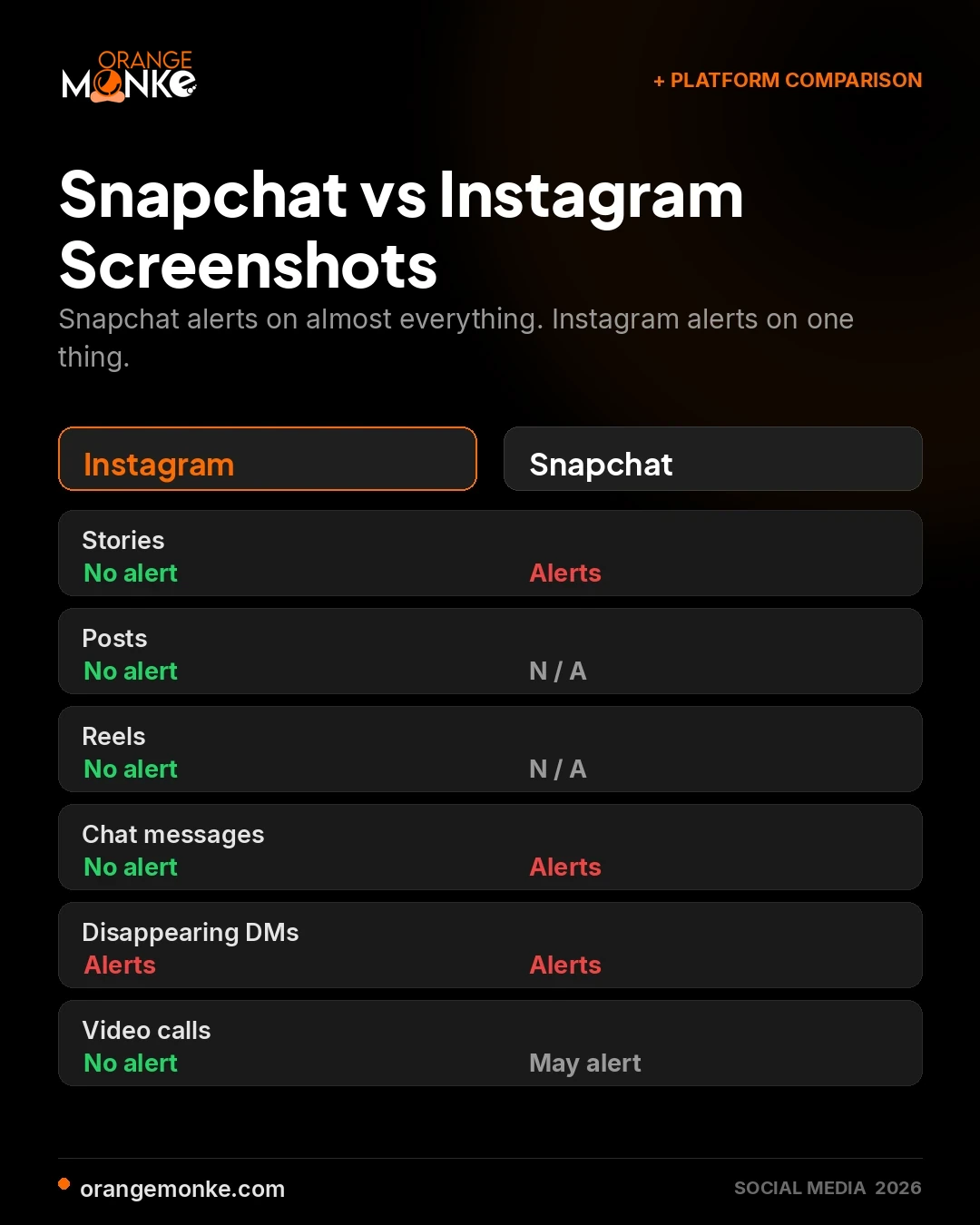
Snapchat alerts on nearly every capture, while Instagram alerts only on disappearing DM media. Many people assume the two work the same way, which is where most screenshot confusion starts.
| Feature | Snapchat | |
|---|---|---|
| Stories | No screenshot notification | Screenshot notification sent |
| Posts | No screenshot notification | Not applicable |
| Reels | No screenshot notification | Not applicable |
| Profiles | No screenshot notification | Not applicable |
| Chat Messages | No notification for normal chats | Screenshot notification sent |
| Disappearing Photos & Videos | Screenshot notification sent | Screenshot notification sent |
| Video Calls | No screenshot notification | May notify in some situations |
If you are switching from Snapchat, assume the opposite default: on Instagram, almost nothing you capture is reported.
How To Hide Your Story From Screenshots On Instagram
You cannot block screenshots outright, but five settings shrink the risk to almost nothing. Instagram gives you audience controls and disappearing formats that keep sensitive Story content away from the wrong viewers.
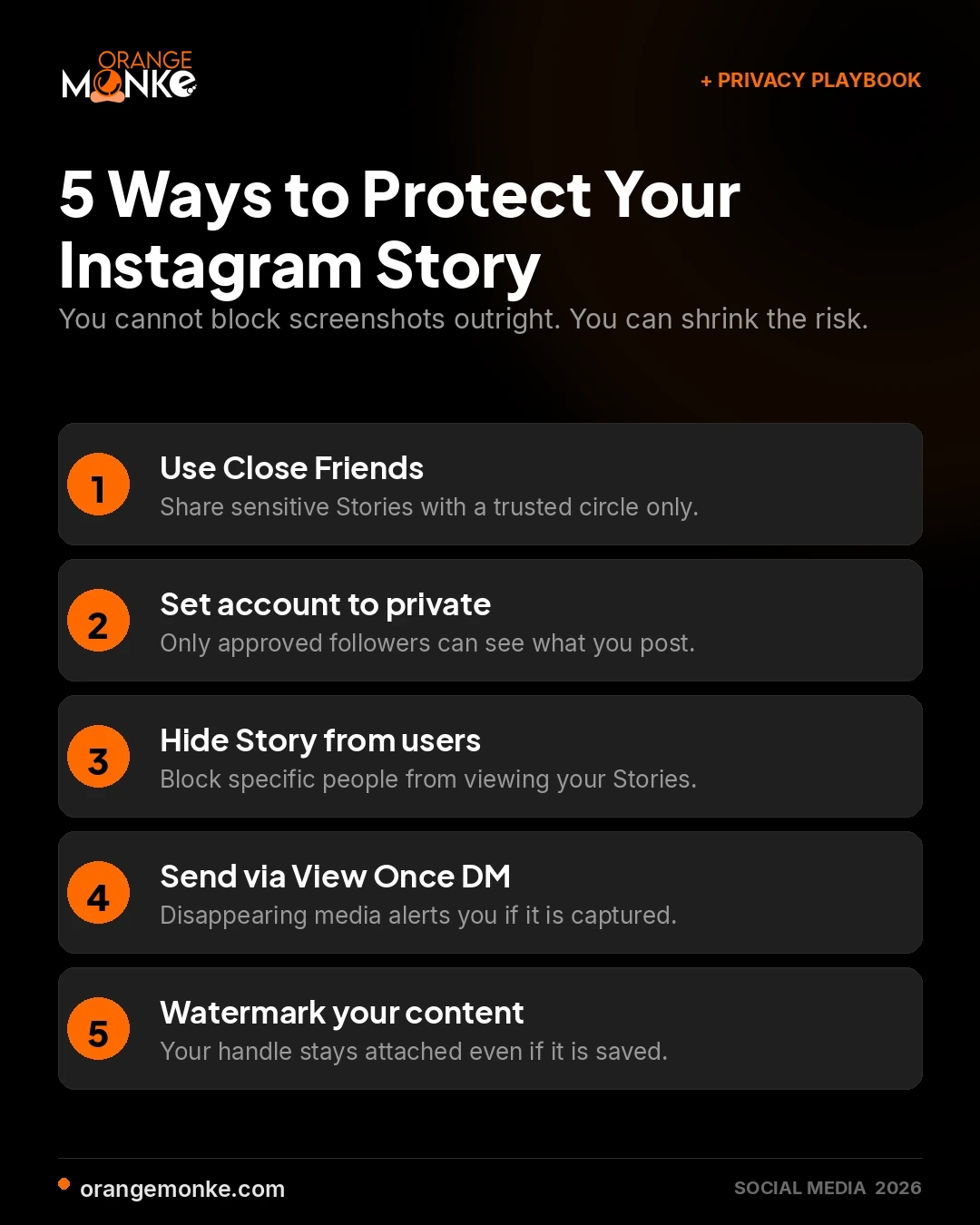
- Use Close Friends for sensitive StoriesShare only with people you trust. Open Story settings, choose Close Friends, then add the followers you want in the circle.
- Set your account to privateOnly approved followers can see your Stories. Go to Settings, then Privacy, then Account Privacy, and switch to Private.
- Hide your Story from specific usersBlock chosen followers from viewing. Go to Settings, then Privacy, then Story, then Hide Story From, and select the users.
- Share disappearing media via DMsFor the most sensitive content, use View Once or Vanish Mode in a DM. These formats alert you if the media is captured.
- Watermark sensitive contentAdd your username or logo so your identity stays attached even if someone saves or reshares the image.
Layering Close Friends, a private account, and disappearing media gives you the tightest control over who can see and capture your Stories. Next step: audit your current Story privacy settings against this list today.
Best Practices for Interacting With Other Users' Content
Engage with other people's content by asking before you reshare and never capturing disappearing DMs without consent. Good etiquette protects both the creator's rights and your own account reputation.
- Ask before resharing: get consent before reposting someone's Story, post, or photo to respect their ownership.
- Do not capture disappearing DMs: View Once and Vanish Mode captures alert the sender and can break trust.
- Respect privacy and copyright: do not share private or copyrighted content without permission.
- Use Save instead of screenshots: bookmarking keeps content private, avoids alerts, and keeps quality intact.
These habits matter even more for brands, where a single mishandled repost can undo months of goodwill. A considered approach is part of maximising your social media presence without cutting corners.
What's the Other Alternative to Screenshotting Someone's Instagram Posts?
Use Instagram's built-in Save feature instead of a screenshot to keep content cleanly and privately. Tap the bookmark icon under any post and it is stored in your Saved folder, reachable anytime from your profile.
Saving keeps the original quality intact, never notifies the poster, and lets you file Reels into named Collections such as Travel, Food, or Fashion. It is the cleaner, quality-safe way to curate content you want to revisit, without a gallery full of screenshots.
The 2018 Story Alert Myth, and the 2026 Fake News
Instagram tested a Story screenshot alert once, in 2018, removed it within months, and has never brought it back. Every viral post claiming a new 2026 alert launched is fabricated to drive panic, shares, and comments.
During the 2018 test, Instagram placed a small icon next to the screenshotter's name in the viewer list. It lasted only a few months before the backlash and falling Story engagement pushed Instagram to pull it. It has not returned, and Instagram has announced no plans to reinstate it. The only content that still triggers a capture alert is disappearing DM media. If you want to keep up with real platform changes rather than rumours, follow a reliable source like our ongoing Instagram algorithm coverage.
What Triggers an Instagram Screenshot Notification?
Only capturing disappearing content sent through Direct Messages triggers a screenshot notification. The sender sees an icon inside the chat thread within seconds of the capture, and no other content type is covered.
- View Once photos: capturing a photo sent with the View Once setting in a DM.
- View Once videos: capturing a video sent with the View Once setting in a DM.
- Vanish Mode messages: screenshotting any message while the chat is in Vanish Mode.
- Screen recordings of the above: recording disappearing DM media fires the identical alert.
Everything permanent is silent: Stories, Close Friends Stories, Highlights, feed posts, carousels, Reels, profiles, follower lists, regular DM text, and standard photos in a normal DM thread. Live broadcasts and video calls are untracked too. The rule stays consistent, if the content was designed to disappear, captures are reported; if it stays put, captures are invisible.
How Private Is Your Content?
Once content is online it is effectively public, because Instagram reports captures only for disappearing DM media. Regular posts, Stories, and profiles can all be saved silently, which leaves a real gap between how private content feels and how private it is.
Instagram's controls, Close Friends, private accounts, and disappearing media, reduce who can see your content, but they cannot stop a determined viewer from capturing it externally. The realistic goal is to limit exposure, not to assume perfect privacy. Post selectively, use disappearing formats for anything sensitive, and read the platform's own privacy announcements so your settings stay current.
Does SS Show Up on Instagram?
Does IG notify when you screenshot a Story? No — IG is just shorthand for Instagram, and the same no-alert rule applies to every Story you capture. an SS (screenshot) does not show up on Instagram for the vast majority of content, and Instagram does not show screenshots of Stories to the account owner. The owner gets no notification, and the capture never appears in any viewer list, insights dashboard, or in-app log.
Does Instagram show screenshots of Stories, does it show if you screenshot an Instagram Story, and can Instagram see screenshots of Stories? In every case, no. These SS actions stay completely private:
- Stories: regular, Close Friends, and Highlights.
- Posts and Reels: feed photos, carousels, and short-form video.
- Profiles: profile photo, bio, and follower or following lists.
- Regular DMs: text messages, voice notes, and permanent attachments.
- Live and video calls: no alert reaches the host or participants.
The only place an SS does show up is inside a Direct Message thread that contains disappearing content. View Once photos, View Once videos, and Vanish Mode messages all notify the sender the moment a screenshot is taken, and screen recording follows the same rule. Workarounds like switching on Airplane Mode before opening a View Once message are unreliable and get patched in app updates, so assume any SS of disappearing DM content will be detected.
Stop guessing what works. Get a strategy that converts.
From content calendars to paid campaigns, we handle the social media work that actually drives business results.
Talk to a social media strategist →Quick Recap: What Happens When You Screenshot on Instagram
Instagram notifies no one when you screenshot a Story, post, profile, Reel, or regular DM, and alerts only on disappearing DM media. Your capture activity stays private and undetected across the entire public platform.
- Silent captures: Stories, Close Friends Stories, Highlights, posts, Reels, profiles, regular DMs, Live, and video calls.
- Reported captures: View Once and Vanish Mode photos and videos in Direct Messages.
- Cleaner than a screenshot: the Save bookmark keeps quality intact and never notifies the creator.
Now that the rules are clear, protect your own content with Close Friends, a private account, and disappearing media for anything sensitive, and lean on Save instead of screenshots. If turning that Instagram presence into real business results is the goal, our team can help you build a social media strategy that does exactly that.
Frequently Asked Questions
No, you cannot tell if someone screenshots your Instagram Story, because Instagram sends no alert and logs nothing.
- No notification: The Story owner receives zero push alert or in-app signal.
- No viewer flag: The person appears only as a normal viewer, never as a screenshotter.
- Screen recording too: Recording the screen while watching a Story is equally invisible.
Only disappearing DM media is ever reported, so treat everything else as capturable. A deliberate social media plan matters more than screenshot worries.
To screenshot an Instagram post, open it and use your device's built-in screenshot shortcut, and no alert is sent.
- On Android: Press Volume Down and Power together.
- On iPhone: Press the Side Button and Volume Up together.
- No notification: The poster is never told you captured their post.
For a cleaner alternative, the Save bookmark stores the post without a screenshot. See how creators use it in our Instagram algorithm guide.
Save Instagram pictures without a screenshot by tapping the bookmark icon to file them privately.
- Use Save: Tap the bookmark under any post to store it in your Saved folder.
- Stay private: The original poster is never notified.
- Keep quality: Saved posts avoid the pixelation of a screenshot.
Collections let you sort saved Reels by theme, which is handy for planning a content calendar.
You cannot see who screenshotted your regular Story, since Instagram never records or shows that data.
- No list exists: There is no screenshot log anywhere in the app.
- Only DMs report: View Once and Vanish Mode DM captures alert the sender.
- Third-party claims are fake: No external app can access this data through Instagram's API.
If audience insight is the real goal, viewer and engagement data is where to focus. Our social media team can help you read it.
No, Instagram does not detect screenshots or screen recordings of feed posts or Reels.
- Posts are silent: Capturing any feed post sends no alert.
- Reels are silent: Screenshots and screen recordings of Reels are untracked.
- Only DMs monitored: Disappearing Direct Message media is the sole exception.
This is why reposting culture thrives on Instagram, covered in our Instagram algorithm breakdown.
No, Close Friends Stories are treated exactly like regular Stories, so screenshots are never reported.
- Audience control only: Close Friends limits who sees the Story, not who captures it.
- No capture alert: Anyone in the circle can screenshot with no notification.
- Use DMs for sensitive media: Only disappearing DM content reports a capture.
Match the format to the sensitivity of the content, a principle we apply in every social media strategy we build.
In 2026, screenshotting a regular Story still sends no notification to the creator.
- Rule unchanged: The no-alert policy has held since the 2018 test was removed.
- Only DMs alert: View Once and Vanish Mode captures notify the sender.
- Rumours are false: Viral 2026 alert claims are fabricated for engagement.
For real platform updates rather than rumours, follow our Instagram algorithm coverage.
Instagram has announced no plan to notify users about screenshots of posts, Reels, or Stories.
- Only DMs monitored: Disappearing Direct Message media remains the single exception.
- Likely to stay: Standard content is expected to remain screenshot-safe.
- Ignore viral claims: Any post announcing a new alert is fake news.
We track confirmed changes as they happen in our Instagram algorithm updates.
No, Instagram does not notify you when someone screenshots a Highlight.
- Highlights are saved Stories: They follow the identical screenshot rule as Stories.
- No alert of any kind: Screenshots and screen recordings are both untracked.
- Only DMs report: Disappearing DM media is the lone exception.
Highlights are a smart way to keep evergreen content visible, a tactic we use in brand social media management.
Instagram's screenshot-related privacy features center on disappearing DMs, audience limits, and the Save tool.
- Disappearing DMs: View Once and Vanish Mode alert the sender on capture.
- Audience controls: Close Friends and private accounts limit who sees your content.
- Save feature: Bookmarking replaces screenshots without notifying the creator.
Using these together gives you practical control, and a documented content strategy ties them to real goals.
No, Instagram does not alert users when their Story is screen recorded.
- Same as screenshots: Screen recording a Story is treated identically and stays silent.
- Covers posts and Reels: Recording feed content is also untracked.
- Only DMs alert: Disappearing DM media is the single exception.
The lesson for creators is simple, assume anything public can be captured, a mindset built into every social media plan we run.
No, third-party apps cannot detect screenshots on Instagram.
- Handled internally: Screenshot alerts live entirely inside Instagram's own systems.
- No API access: Instagram does not expose capture data to outside apps.
- Claims are scams: Apps promising to reveal screenshotters are not legitimate.
Avoid these apps entirely, they risk your account, unlike the safe growth tactics in our Instagram algorithm guide.
Yes, Instagram notifies the sender only if you screenshot a disappearing video sent through a Direct Message.
- View Once and Vanish Mode: Capturing these disappearing videos alerts the sender.
- Regular DM videos are silent: Standard media in a normal DM thread sends no alert.
- Screen recording counts: Recording disappearing DM video fires the same notification.
Understanding which formats report captures helps brands communicate safely, part of a sound social media approach.