Add Me to Search launched in 2020 as Google's free digital business card for individuals. It rolled out first in India, then Nigeria, Kenya, and South Africa, so freelancers, entrepreneurs, and everyday people could appear at the top of results for their own name.
How it worked
Users searched "add me to search" or "add me to Google" on their mobile device, which opened a setup form linked to their Google account, where they could list:
- Name, job title, and profession
- Location and short bio
- Social media links, websites, and contact info
The goal
It opened up a spot that used to require a Google Knowledge Panel, so independent professionals could be found by clients without deep SEO expertise.
Where it stands now
In 2026, the status is restricted rather than settled, so what is true depends on your account:
- New-card creation is gated by region and account, so the "Get started" prompt shows for some users and not for others.
- It still appears mainly for individuals in India, Nigeria, Kenya, and South Africa, and a VPN does not unlock it because Google checks the account, not just the location.
- Most existing cards still work, so if you already have one, keep it accurate rather than deleting it.
The reliable way to know is to search "add me to search" on your own phone and see whether the prompt appears, which is exactly why so many people now search whether it still works.
What's new
In the United States, where People Cards never rolled out, Google now offers Search Profiles, a creator-focused profile that pulls your work from YouTube, Instagram, X, and TikTok into one place on Search and Discover. It has a high follower bar, and the section below covers who qualifies and how to claim one.
Google's Add Me to Search feature, officially the Google People Card, works a little like a Google Business Profile, except it represents a person instead of a business. This guide covers what it is, whether it still works in 2026, how to create and verify your card on your phone, how to optimize it, and what to do if it is not available where you are.
How do I add myself to Google Search? To add yourself to Google Search, open Google on your mobile browser while signed into your Google account, search "add me to search", and tap "Get started". Fill in your name, location, job title, bio, website, and social links, verify your phone number by SMS, and save. Your Google People Card then appears in results for your name, usually within a few hours.
What Is Add Me to Search?
Add Me to Search is a free Google feature that puts a personal profile, the Google People Card, at the top of results when someone searches your name. Think of it as a virtual business card, or a mini knowledge panel you control, showing your photo, job title, a short bio, your website, and your social links. One limit is worth knowing early: you cannot create a People Card if you already have a Google Knowledge Panel, which Google reserves for well-known public figures.
The phrase "add me to search" is the query you type to begin, and you may also see it as "add me to Google search", "add me to Google", "add me on Google", or "add me search". Google launched the feature in 2020, starting in India and expanding to Nigeria, Kenya, and South Africa, aimed at individuals with no web presence strong enough to trigger a knowledge panel. If you want your name to work as hard as your wider SEO does, this is the fastest starting point.
What's New in 2026? Google Search Profiles
Google Search Profiles are Google's newer, creator-focused way to be found by name, and in 2026 they are the closest official option in the United States, where People Cards never rolled out. A Search profile pulls your work from platforms like YouTube, Instagram, X, and TikTok into one profile that appears on Google Search and Google Discover when someone looks you up.
The trade-off is a high eligibility bar, so it is built for established creators rather than everyone:
- Following. At least 100,000 followers on YouTube, Instagram, or X, or 300,000 on TikTok.
- Age. You must be 18 or older.
- Policies. Your content must meet Google's content guidelines.
If you qualify, check for an auto-generated profile at profile.google.com and claim it, or create one at profile.google.com/claim. Google confirms a Search profile does not directly affect your content's ranking, but it does make you easier to discover on Search and Discover.
A People Card is for any individual in supported regions like India and Nigeria, with no follower requirement. A Search profile is for large creators and, for now, only in the United States. If you are a US creator who clears the follower thresholds, a Search profile is your route, and everyone else should use the options later in this guide.
Is Add Me to Search Discontinued? A 30-Second Self-Check
Add Me to Search is not fully discontinued, but new-card creation is now restricted and gated by region and account, which is why some users see it and others do not. Reports genuinely conflict: some say Google retired People Cards outright, others confirm the prompt still appears in a few regions. The only answer that is true for you is the one your own phone gives you.
Run this 30-second check. Sign into your Google account on a mobile browser, search add me to search, and look at the top of the results.
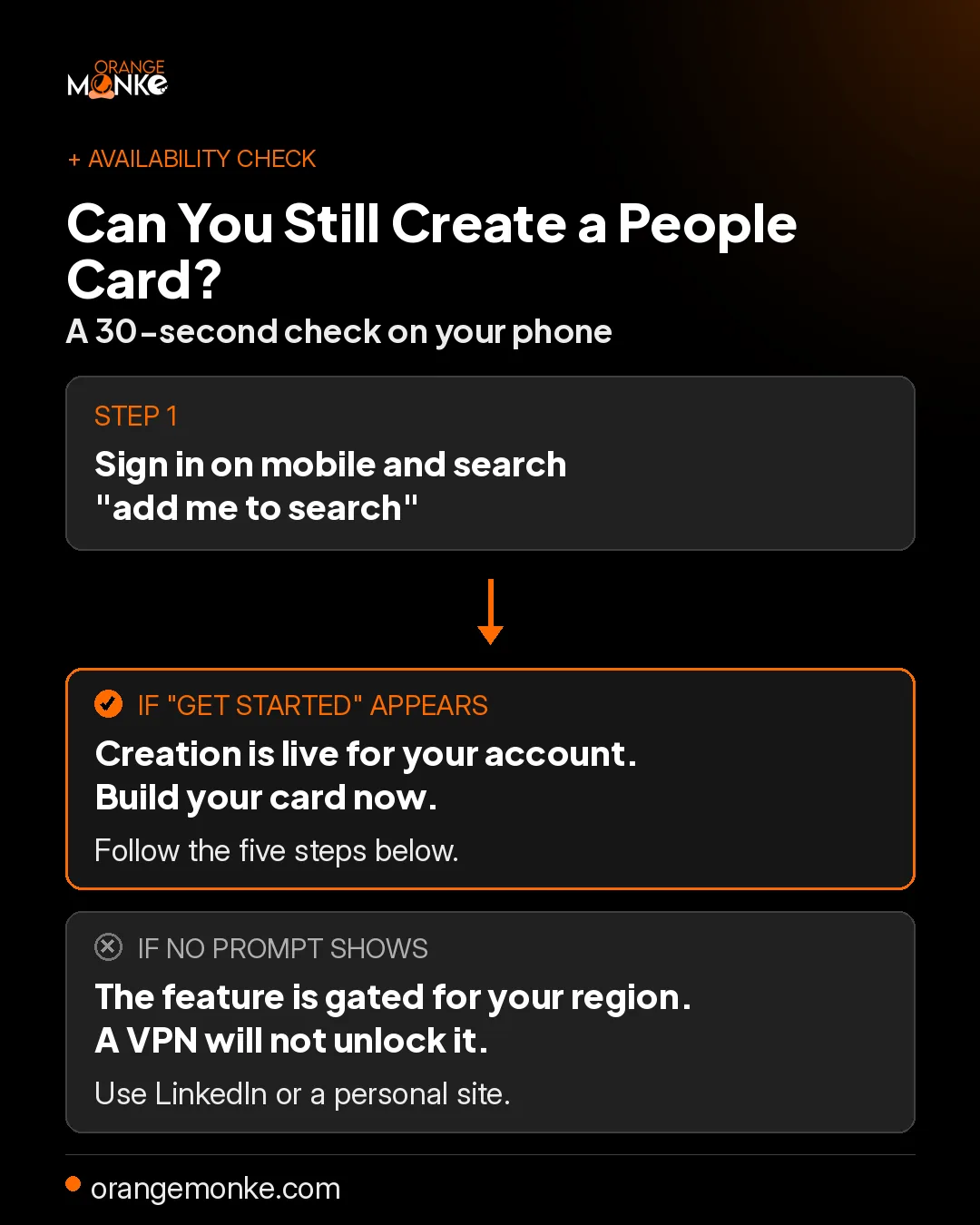
- If a "Get started" card appears, creation is live for your account, so follow the steps below.
- If it does not appear, the feature is gated for your region or account, and no VPN unlocks it, because Google checks the account rather than the IP address.
People searching "add me to search 2026", "is google people card still available", or "add me to search not showing" are usually hitting exactly this gating. It is not a fault on your side, so run the self-check above before assuming your card failed.
Which Countries Can Use Add Me to Search in 2026?
Add Me to Search works for individuals in India, Nigeria, Kenya, and South Africa in 2026, with limited access in Bangladesh, Pakistan, and Nepal, and no rollout in the United States. Most searches for the feature come from India, Nigeria, Bangladesh, and South Africa, which lines up with where it is or was live. So if you want to use Add Me to Search in India, or in Nigeria, Kenya, or South Africa, the mobile steps further down apply to you directly.
| Country | Availability |
|---|---|
| India | Available |
| Nigeria | Available |
| Kenya | Available |
| South Africa | Available |
| Bangladesh | Limited |
| Pakistan | Limited |
| Nepal | Limited |
| United States | Not rolling |
In the United States, the closest official option is Google Search Profiles, covered above. If you are outside all these regions, skip to the alternatives section, which does most of the same job.
What Are the Benefits of Adding Me to Search on Google?
Adding yourself to Google Search gives you control of your name in results, free top-of-page visibility above LinkedIn, and a direct link to your website, all in under fifteen minutes. For freelancers, job seekers, and anyone with a common name, it is the cheapest reputation tool available, it puts you in front of recruiters and clients, and yes, it is completely free.
- Instant top-of-page visibilityYour card appears near the top of the search engine results the day it goes live, with no backlinks or years of SEO work needed.
- You control your first impressionYou decide your title, bio, photo, and links, which is the foundation of any online reputation you want to protect.
- It solves the wrong-person problemA card with your specific location, photo, and profession anchors results to the right you, so clients stop landing on a stranger with your name.
- It drives free, high-intent trafficEvery card carries a website link and several social links, sending organic traffic from people already searching your name.
- It is free and fastThere are no paid tiers, so searches like "add me to google free" are right, and a card can be live in under fifteen minutes.
How to Add Yourself to Google Search?
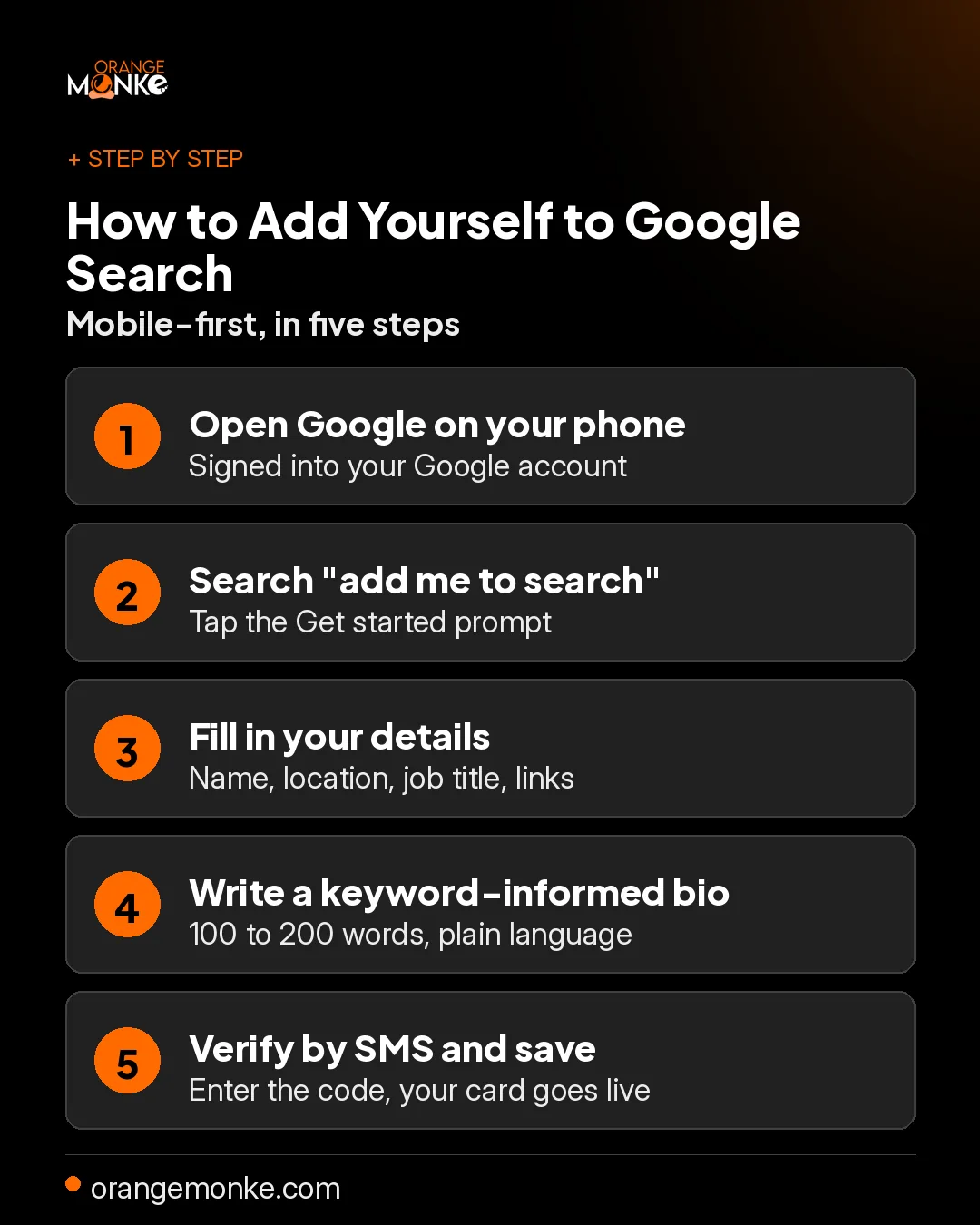
To add yourself to Google Search, open Google on your phone, search "add me to search", tap Get started, complete your profile, verify by SMS, and save. If you have searched how to add me to search, or how to add yourself to search, this is the full process, and you can add me to search on Google straight from your phone. It is mobile-first, so most people searching "add me to search get started on my phone" are in exactly the right place.
Have a Google account signed in on your phone, a clear headshot on that account, your website URL, links to two to four active social profiles, and a phone number that can receive an SMS.
- Open Google on your mobile browserGo to google.com in Chrome or Safari on your phone and make sure you are signed in.
- Search "add me to search"Type the exact phrase to search "add me to search" on Google; if the feature is available, the Add Me to Search Get started prompt appears at the top of results.
- Tap "Get started" and fill in your detailsAdd your name, location, job title, bio, website, and social links. Every field you complete raises the card's usefulness.
- Write a strong, keyword-informed bioWrite 100 to 200 words in plain language, stating what you do, where, and who you serve, using natural phrases people search like "UX designer in Hyderabad", without stuffing.
- Preview, verify, and saveCheck your name, photo, and links, complete phone verification, then save so your card enters Google's review queue.
If you are on desktop and do not see the option, open google.com in mobile-emulation mode (press F12, then toggle the device toolbar in Chrome) and search from there.
How to Verify Your Phone Number for Add Me to Search?
Phone verification is a required step, and it is where most People Card attempts quietly fail, because your card does not go live until you enter the SMS code Google sends. To pass it cleanly, have a number that can receive an SMS ready before you start, and enter it with the correct country code.
Add Me to Search "Get started" not working on your phone?
"Add me to search get started" usually stalls on your phone because of verification, so work through these fixes in order:
- No code arrives. Wait two minutes, confirm signal, and request the code again rather than resubmitting the whole form.
- The code is rejected. Re-enter it without spaces and make sure the number matches the one on your Google account.
- It keeps failing on the same number. Some carriers route Google's SMS poorly, so try a different number on a stable network.
Once the code is accepted, your card enters the review queue and usually appears within a few minutes to a few hours.
What Information Appears on a Google People Card?
A Google People Card displays your name, location, bio, occupation, photo, website, and social links, and you decide how much to show. Your People Card, also called your Add Me to Search profile or your Add Me to Google Search card, is free to set up. Not every field is mandatory, but the more you complete, the more useful and trustworthy the card looks.
- Name. Your full name as you want it to appear in results.
- Location. Your city or region, at a level of detail you control.
- Bio and occupation. A short description of who you are and what you do.
- Profile photo. Pulled from your Google account.
- Website and social links. Your site plus LinkedIn, X, Facebook, YouTube, and Instagram.
You can publish a card with just your name, location, and bio, but a complete card is what actually earns trust and visibility.
How to Optimize Your People Card to Rank Higher?
To optimize your People Card, link verified social profiles, keep your name and location identical across the web, and use the exact name people search, because Google ranks cards on account authority and consistency. Creating the card is step one; these signals decide whether it ranks prominently or gets buried.
- Use your exact search-intent nameUse the version of your name people actually search, not your full legal name if you go by something shorter.
- Link verified social profilesConnect your active social profiles, since a card tied to real accounts signals legitimacy.
- Keep your details identical across the webGoogle cross-references your card against other mentions, so keep your name, location, and role the same everywhere.
- Build a supporting web presenceA simple site and a few authoritative pages tell Google you are a real, notable individual worth surfacing.
A People Card is one signal. Getting found takes a real plan.
We build the search and AI visibility that makes your name, and your brand, the answer people find first.
Get a free visibility audit →How to Edit and Update Your People Card?
To edit your People Card, sign in on mobile, search "edit my people card", tap Edit, change any field, and save; updates appear within a few hours. There is no separate Add Me to Search login, so you sign in with your normal Google account, then search "add me to search" or "edit my people card" and tap Edit. The process has not changed for 2026, so searching "edit my people card 2026" lands you in the same place, and there is no penalty for editing often, so keep it current rather than letting it go stale.
To remove your card, open the edit view and look for "Remove your card" or "Delete" at the bottom. Once removed, the card disappears from results within a day or two, and you can recreate one later.
Common Add Me to Search Problems and Fixes
Most Add Me to Search problems trace to four causes: a gated region, a pending review, a shared name, or auto-filled data, and each has a specific fix below.
Why is Add Me to Search not showing the Get started option?
Add Me to Search is not showing the Get started option because your region is unsupported, you are not signed in on mobile, or location is off. Confirm all three, then clear your Google app cache and retry.
Why is my card not appearing in search results?
Your card is not appearing because it is still in Google's review queue, so wait at least 72 hours, then confirm it saved by searching "edit my people card". A pending policy review or account inconsistencies can also delay it.
Why does someone else's card show for my name?
Someone else's card shows for your name when you share a name and their account carries stronger authority and location signals. Strengthen yours with a complete LinkedIn, a personal site, and consistent profiles.
How do I fix wrong information I cannot edit?
Wrong information you cannot edit is usually auto-filled from other sources, so override it in the edit view; if a field stays stuck, use "Report a problem" so Google can correct it.
People Card vs Google Business Profile
A People Card is for a person and a Google Business Profile is for a business: use a People Card for name searches and a Business Profile for service, brand, and "near me" searches. Picking the wrong one is the most common mistake we see, because they answer completely different queries.
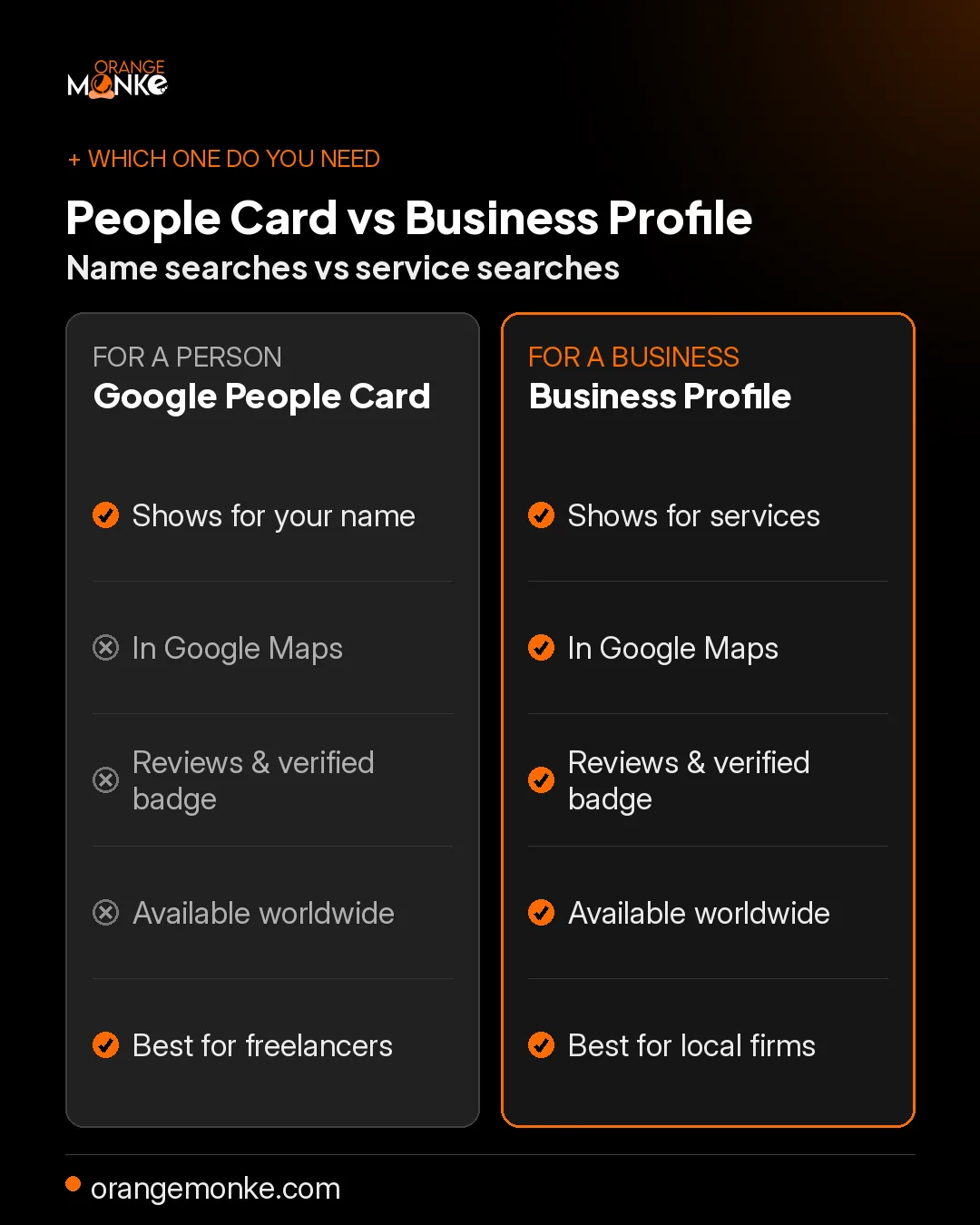
| Feature | Google People Card | Google Business Profile |
|---|---|---|
| Built for | An individual | A business or location |
| Appears for | Searches of your name | Service, brand, or "near me" searches |
| Shows in Maps | No | Yes |
| Reviews and verified badge | No | Yes |
| Availability | Region-gated, inconsistent | Available worldwide |
| Best for | Freelancers, job seekers, creators | Shops, clinics, agencies, service areas |
The two are not rivals, and a solo professional can run both.
If you are the face of your business, a well-optimized Google Business Profile is often the stronger long-term asset, because it works everywhere, carries reviews, and cannot be gated out of existence.
Best Alternatives When Add Me to Search Isn't Available
The best alternatives to Add Me to Search are a complete LinkedIn profile, a personal website with Person schema, an About.me page, and a Google Business Profile, all free or low cost. In most cases they are more durable than a card that can be gated at any time.
| Method | Time to set up | SEO value | Free? |
|---|---|---|---|
| Google People Card | 10 to 30 minutes | High, top of results | Yes |
| LinkedIn profile | 1 to 2 hours | Very high, ranks globally | Yes |
| Personal website | A few hours | Highest, fully controlled | Hosting only |
| About.me profile | 15 minutes | Medium | Yes |
| Google Business Profile | 30 to 60 minutes | High, local search | Yes |
Why is a LinkedIn profile the fastest alternative?
A LinkedIn profile is the fastest alternative because it almost always ranks on page one of Google for your name, often in the top few results. Complete every section, add a professional headshot, and set a custom URL to get the most from it.
Why does a personal website win long-term?
A personal website wins long-term because you own it, it is not subject to any platform's policy changes, and Person structured data lets search engines read your identity directly. That also makes you easier for AI answers to cite when your name comes up.
Want to own your name and your local searches?
We optimize your Google Business Profile so you show up in Search and Maps, with reviews that build trust and drive calls.
Optimize my Google profile →Conclusion
Your name is one of the most valuable keywords you own, and Add Me to Search lets you control it where the feature is available. Whether you are a freelancer, job seeker, creator, or business owner, a Google People Card helps you stand out, build trust, and own your digital identity in minutes.
Where the feature is gated, the fundamentals still win: a complete LinkedIn profile, a personal site with Person schema, and consistent details everywhere. At Orange MonkE, we help people and brands build a discoverable presence that ranks on Google and gets cited by AI, through SEO, AI SEO, and content that works. Because in 2026, if you are not showing up right, you are missing out.
Frequently Asked Questions
- Gated: new-card creation is inconsistent and limited by region and account.
- Still live: the prompt appears for some users in India, Nigeria, Kenya, and South Africa.
- Check yourself: search "add me to search" on your phone and see whether "Get started" shows.
Either way, build a wider AI-ready presence so your name stays covered.
- No paid tiers: every feature is included, so searches like "add me to google free" are accurate.
- What you need: a personal Google account and, in a supported region, a phone number for SMS.
It is one of the cheapest ways to strengthen your SEO.
- People Card: appears when someone searches your name.
- Business Profile: appears for service, brand, and "near me" searches and in Google Maps.
A solo professional can run both, and we set up the business side through Google Business Profile optimization.
- What it is: a virtual business card for your name.
- Where it shows: in results when someone searches you.
It is a simple, free tool for personal branding and content-led visibility.
- Fill in: your details, then verify your phone number and save.
- Timing: most cards go live within 24 to 72 hours.
Pair it with strong search positioning so your other profiles rank for your name too.
- Review: Google checks each submission before it goes live.
- If it stalls: after five days, confirm it saved by searching "edit my people card".
Consistent profiles help it, the same way they help your organic traffic.
- Desktop workaround: emulate a mobile device in Chrome (press F12, toggle the device toolbar), then search.
- Better long-term: a mobile-friendly site and solid technical SEO matter more than the device.
For lasting visibility, invest in your on-site SEO, not just the card.
- Check: you are signed in on mobile with location turned on.
- VPN will not help: Google checks the account, not just the location.
If it is not available, protect your name through reputation management.
- LinkedIn: almost always ranks on page one of Google for your name.
- Personal site: you own it, and Person schema makes you easy for AI to cite.
Your social profiles reinforce them when they carry a consistent name and bio.
- Edit: your card appears with an Edit option for any field.
- Delete: open the edit form and choose "Remove your card" at the bottom.
Keeping it current is part of the same discipline that helps you reach the right audience.
- Skip: your personal phone number, home address, and financial details.
- Keep: your name, job title, city, website, and social links.
Treat it like a public business card, and let your owned content carry the deeper story.
- Also blocked: if you already have a Google Knowledge Panel.
- Use instead: a Google Business Profile, which shows in Maps with reviews and a verified badge.
We handle that end to end through Google Business Profile optimization.