
 Dec 11, 2025
  15 Min Read
As soon as you like someone’s Instagram Story and think about saving it to your phone, you wonder: Does Instagram notify when you screenshot a story? Well, Insta Stories are meant to be temporary, which naturally raises questions about whether Instagram really sends a notification when you take a screenshot of a post. What about taking screenshots of Instagram stories, Reels, or DMs?
For most IG Stories, Instagram does not notify users when someone takes a screenshot. This means you can save a funny meme, a travel photo, or a recipe without sending any alert to the end user. However, Instagram only sends screenshot notifications in one specific scenario, which is when you screenshot a disappearing photo or video sent through Direct Messages. Outside of this case, your screenshots remain completely private — no notification is sent to the other user.
Understanding exactly when Instagram detects screenshots — and when it doesn’t — can save you from accidental privacy slip-ups and help you navigate the platform with confidence. In this guide, we’ll break down when Instagram sends alerts, how screenshots work across different features, and answer the most common Instagram screenshot questions that users often wonder about.
Does Instagram Notify When You Screenshot a Story?
No, Instagram does not notify users when you screenshot their Story. As of 2024, Instagram removed the screenshot notification feature for Stories entirely. You can screenshot any Instagram Story — whether it belongs to a public account, a private account, or even someone who has added you to their Close Friends list — and they will not receive any alert.
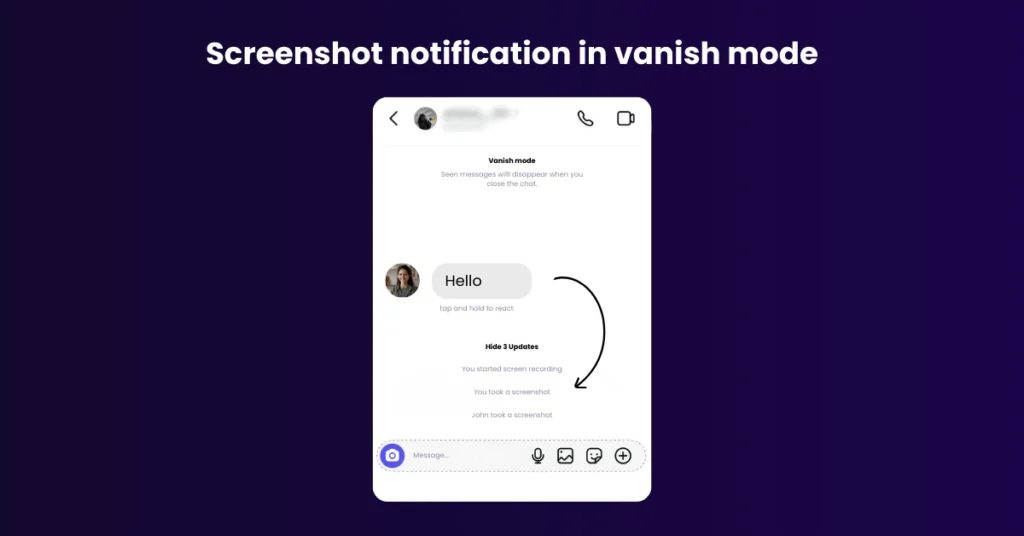
Instagram sends a screenshot notification in exactly one scenario: if someone sends you a disappearing image or video through Instagram DMs — content that vanishes after it has been viewed — and you take a screenshot, Instagram immediately notifies the sender with an alert in the chat thread. This is the only trigger. Everything else is undetected.
What Happens If You Screen Record an Instagram Story?
Screen recording an Instagram Story also does not trigger a notification. Whether you take a static screenshot or record your screen while watching a Story, the account owner receives no alert of any kind. The same rule applies to Reels, Feed posts, and Highlights.
Other Quick Answers Related To Does Instagram Notify When You Screenshot:
Question: Did Instagram use to notify Story screenshots?
Answer: Yes. Instagram briefly tested screenshot notifications for Stories in 2018 but removed the feature permanently after user backlash.
Question: Does Instagram notify when you screenshot a DM conversation?
Answer: No — unless the message contains a disappearing photo or video. Standard DM text, images shared from the feed, and links do not trigger notifications.
Question: Does Instagram notify when you screenshot a Reel?
Answer: No. Screenshotting or screen recording a Reel does not send any notification to the creator.
Question: Will Instagram bring back Story screenshot notifications?
Answer: There is no confirmed plan from Instagram to reintroduce this feature. As of 2025, screenshot notifications remain limited exclusively to disappearing DM content.
Question: Can someone tell when you screenshot their instagram story?
Answer: No, someone cannot tell when you screenshot their Instagram Story. Instagram does not send any notification to the account owner when their Story is screenshotted. This applies to every type of account — public, private, business, and creator accounts — without exception.
Question: Can people see if i screenshot their instagram story?
Answer: No. There is no direct or indirect way for someone to find out you screenshotted their Instagram Story. Here is why:
- No push notification is sent — The Story owner receives zero alert
- Screenshot activity does not appear in the viewer list — You only appear as a viewer, not as someone who screenshotted
- No in-app activity log exists — Instagram does not record or display screenshot data to any user
- Screen recording is also undetected — Recording your screen while watching a Story is equally invisible to the owner
Do You Get Notified When Someone Else Takes a Screenshot of Your Instagram Story?
Many Instagram users wonder if they can see who screenshots their Stories. The truth is, Instagram does not notify you when someone takes a screenshot of a regular Story. This applies to both public and private accounts. Even Stories shared with a select group of Close Friends do not trigger notifications, allowing you to share private moments without alerts. The only exception is disappearing DMs, such as View Once messages and Vanish Mode chats — these types of content will notify the sender immediately if someone takes a screenshot.
Here is an easy way to understand when your screenshot is notified:
| Content Type | Screenshot Notification | Notes |
| Stories (Regular) | No | Screenshots of normal Stories do not alert the creator. |
| Stories (Close Friends) | No | Even private Close Friends Stories are safe to screenshot. |
| Feed Posts / Reels | No | Screenshots or screen recordings do not trigger alerts. |
| Profiles / Bios / Highlights | No | Profile content is public; no notifications. |
| Permanent DMs | No | Text and media saved in chat are not tracked. |
| Disappearing DMs (View Once / Vanish Mode) | Yes | The sender is immediately notified. |
Does Instagram Notify When You Screenshot a Close Friend’s Story?
No, Instagram does not notify users when someone screenshots a Story shared with Close Friends. While the Close Friends feature is designed to limit content visibility to a trusted group, screenshotting these Stories is untracked. This allows users to save private moments without causing alarm. However, as always, sensitive content can still be captured externally, so it’s important to share carefully even with Close Friends.
Does Instagram Notify When You Screenshot a Story on a Computer?
Instagram does not notify users if someone screenshots a Story while viewing it on a desktop computer. Unlike disappearing DMs, standard Stories—whether on mobile or desktop—are not tracked for screenshots. Users often believe that computers might trigger notifications, but Instagram’s screenshot alerts only apply to disappearing content in DMs.
Does Instagram Notify When You Screenshot a Post, Profile, or DM?
Understand Instagram’s screenshot notifications across posts, profiles, and Direct Messages, and learn when your activity stays private or triggers alerts.
- Posts and Profiles: Instagram does not notify when you screenshot any feed post, Reels, or user profile. You can freely save images, videos, and bios without triggering alerts.
- Regular DMs: Screenshots of standard chat messages in DMs are not notified to the sender.
- Disappearing DMs: Only screenshots of View Once messages or messages in Vanish Mode trigger notifications to the sender.
Does Instagram Notify When You Screenshot A Post?
Instagram does not notify users when you screenshot a feed post. This means you can freely save that inspiring travel photo, hilarious meme, or any content that catches your eye without alerting the poster.
| Bonus Tip: If you want to save a post without taking a screenshot, use Instagram’s built-in Save feature. Tap the little bookmark icon beneath a post, and it will be saved to your “Saved” folder. The best part? The user won’t be notified, and your phone’s gallery won’t get cluttered or risk pixelated screenshots. |
Does Instagram Notify When You Screenshot A Profile?
When you take a screenshot of someone’s profile—including their profile picture, bio, posts grid, followers/following list, or highlights—Instagram does not notify the user. You can freely capture this information without sending any alert. Profiles are considered public (or semi-public for private accounts), so screenshots here are treated like any other content.
Why Instagram Doesn’t Notify You About Story Screenshots?
Instagram no longer notifies users when someone screenshots a Story to prioritize user experience and privacy. Initially, the platform tested screenshot alerts in 2018, showing a small camera icon next to the viewer’s name. However, this feature was removed due to multiple reasons, which are listed below:
Reason 1: Caused Anxiety and Limited Engagement
Many users felt anxious about saving or sharing content because they didn’t want to offend the creator. Users worried that screenshotting a Story could damage relationships or be misinterpreted, which led to hesitation in engaging naturally with content.
Removing screenshot notifications allowed users to interact freely, like saving memories or sharing Stories with friends, without feeling monitored or judged. This improved overall engagement and comfort on the platform.
Reason 2: Technical Challenges
Screenshot alerts were difficult to enforce consistently. Third-party apps, external screen recorders, or multiple devices could bypass the alert system entirely, making notifications unreliable.
In addition, Instagram had to manage millions of screenshots per day, which created technical complexity and slowed down the app for some users. Removing the feature simplified the platform while maintaining core functionality, ensuring a smoother and safer user experience.
Reason 3: Encouraging Freer Content Sharing
Instagram’s goal was to make sharing content less stressful and more spontaneous. Notifications could discourage users from posting Stories, limiting self-expression and creativity.
By removing screenshot alerts, users could share photos, videos, and moments without constant worry about monitoring. This boosted content creation, encouraged authenticity, and helped Stories remain a fun, engaging feature rather than a source of stress.
| REMEMBER: Even though regular Stories on Instagram don’t trigger notifications when you screenshot them, always be mindful of what you post, sensitive or personal content can still be captured externally. |
How To Hide Your Story From Screenshots On Instagram
If you are worried about getting your stories being screenshot then here is what you can do. While Instagram doesn’t allow you to completely block screenshots, you can minimize the risk and protect your content using these steps:
1. Use Close Friends for Sensitive Stories
Share Stories only with people you trust. This ensures that private or personal content is visible only to selected followers. To do this, go to Story settings, choose Close Friends, then Add people you trust.
2. Set Your Account to Private
Switching to a private account ensures that only approved followers can see your Stories. Go to Settings → Privacy → Account Privacy → Switch to Private. This adds an extra layer of security for your content.
3. Hide Your Story from Specific Users
You can prevent certain followers from viewing your Stories. Navigate to Settings → Privacy → Story → Hide Story From → Select users. This feature is useful if you want to restrict sensitive content from particular people.
4. Share Disappearing Media via DMs
For highly sensitive content, use View Once or Vanish Mode in DMs. These disappearing messages notify the sender if someone screenshots, giving you better control over your private media.
5. Watermark Sensitive Content
Adding your username, logo, or watermark discourages unauthorized sharing. Even if someone screenshots, your identity remains attached to the content.
| Pro Tip: Combining Close Friends, private account settings, and disappearing media provides the best control over who can access your Stories safely |
Best Practices for Interacting with Other Users’ Content
Learn how to engage with posts, Stories, and Reels responsibly while respecting privacy and maximizing your social media experience.
1. Ask Permission Before Sharing or Reposting
Before reposting someone else’s Story, post, or photo, always seek consent. Respecting the creator’s ownership prevents misunderstandings and protects online etiquette.
2. Avoid Screenshotting Disappearing Messages Without Consent
Screenshots of disappearing DMs or Vanish Mode messages notify the sender. Avoid capturing this content without permission, as it violates privacy and trust.
3. Respect Privacy and Intellectual Property
Do not share private or copyrighted content without authorization. Respecting others’ rights builds a safer, more trustworthy Instagram community.
4. Use Save/Bookmark
Instagram allows you to save or bookmark posts to revisit later. This method keeps content private, avoids unnecessary notifications, and supports ethical social media behavior.
What’s the Other Alternative to Screenshotting Someone’s Instagram Posts?
Instagram offers a built-in Save feature as a seamless alternative. By tapping the bookmark icon beneath any post, you can store content directly in your “Saved” folder, accessible anytime from your profile.
This method keeps your gallery clean and ensures that the post remains high-quality. Plus, the original poster is not notified, maintaining your privacy and respecting content ownership. For Reels, you can also use Instagram’s Save to Collection option, organizing posts by categories such as Travel, Food, or Fashion.
By using these features, you can easily curate and revisit favorite content without taking screenshots, making it a smart, privacy-friendly, and SEO-friendly alternative to traditional screenshotting.
How Private Is Your Content?
After reading all the above information, do you still feel your content on Social media is private? Screenshots have become a common way for users to save and share content, from posts and stories to disappearing messages. While platforms like Instagram, Facebook, and Twitter provide some privacy controls, the truth is that once content is online, it’s hard to control how it spreads.
Instagram, for example, notifies users only when disappearing photos or videos in DMs are screenshotted, but regular posts, stories, and profiles can be captured silently. This blurs the line between private and public sharing, leaving users with a false sense of security.
To protect your content, consider using built-in save features, posting selectively, and understanding platform privacy settings. In a world of screenshots and screen recordings, true social media privacy may be more of an illusion than reality.
Quick Recap: What Happens When You Screenshot on Instagram
Here’s the bottom line: Instagram does not notify users when you take a screenshot of a story, post, profile, Reel, or regular Direct Message. Your activity stays private and undetected.
The only exception is disappearing (vanishing) DMs; screenshots of these messages will trigger a notification to the sender.
For better privacy control, consider hiding your Stories from specific followers. And when it comes to saving posts, the Save (bookmark) feature is a smarter, cleaner alternative to screenshots. It keeps your gallery organized and maintains the original post’s quality without notifying the creator.
Take Control of Your Instagram Privacy
Now that you know Instagram does not notify users when you screenshot a Story, except for disappearing DMs which send an immediate notification, you can better manage your privacy. Protect sensitive content by using Close Friends, private accounts, disappearing media, and the Save feature instead of screenshots.
Always respect others’ privacy and intellectual property when sharing or saving content. Start applying these tips today to enjoy Instagram worry-free, keep your activity secure, and make the most of the platform responsibly.
Happy and safe Instagramming!
FAQs
1. Can I know if someone screenshot my Instagram Story?
Instagram does not notify users when someone screenshots a regular Story. Only disappearing photos or videos sent via Direct Message will trigger a notification. Regular Stories remain private from screenshot alerts.
2. How do you take a screenshot of an Instagram post?
To screenshot an Instagram post, open the post on your device, then use your phone’s standard screenshot function—typically Volume Down + Power button on Android or Side Button + Volume Up on iPhone. No alert is sent.
3. How do you save Instagram pictures without screenshots?
Use Instagram’s Save feature by tapping the bookmark icon under the post. The post is stored in your “Saved” folder, keeping your gallery uncluttered and the original poster unaware of your activity.
4. How can you see who screenshotted your Story?
You cannot see who screenshotted your regular Stories. Instagram only shows notifications for disappearing photos or videos sent in Direct Messages. Regular Story screenshots are completely private.
5. Can Instagram detect screenshots of posts or reels?
No, Instagram does not detect screenshots or screen recordings of feed posts or Reels. Only disappearing content in Direct Messages is monitored for screenshot notifications.
6. Will Instagram notify me if someone screenshots my close friend story?
No, even Close Friends Stories are treated like regular Stories. Instagram does not notify the creator if someone takes a screenshot. Only disappearing DM content triggers alerts.
7. What happens if I screenshot an Instagram story in 2025?
As of 2025, taking a screenshot of a regular Story won’t notify the user. Only disappearing messages in DMs trigger screenshot alerts, keeping standard Stories safe for saving or sharing privately.
8. Will Instagram ever start notifying for screenshots again?
Instagram has no announced plans to notify users about screenshots of regular posts, Reels, or Stories. Only Vanish Mode DM content is monitored, and standard content is likely to remain screenshot-safe.
9. Does Instagram tell you if someone screenshots your highlights?
No, Instagram does not notify you if someone screenshots a Highlight. Highlights are essentially saved Stories, and standard screenshot rules apply—notifications only occur for disappearing DM content.
10. What are Instagram’s current privacy features for screenshots?
Instagram’s privacy features include, disappearing messages that notify senders if screenshotted, Close Friends Stories, private accounts, and the Save feature for posts, letting users control visibility while keeping content screenshot-safe.
11. Does Instagram notify you when you screen record a story?
No, Instagram does not alert users when a Story is screen recorded. Only disappearing photos or videos in DMs trigger notifications, while regular Stories, posts, and Reels remain safe from detection.
12. Can third-party apps detect Instagram screenshots?
No, third-party apps cannot detect screenshots on Instagram. Screenshot notifications are handled entirely within Instagram, and apps outside the platform have no access to this data.
13. Does instagram notify when you screenshot a DM video?
Yes, Instagram only notifies the sender if you screenshot a disappearing (vanishing) photo or video sent via Direct Message. Regular videos or media in standard DMs do not trigger any notifications.


We build the digital growth engine for businesses that don't have the time, team or clarity to do it themselves
Let's Start Your Success Story